3-D rotation without a trackball
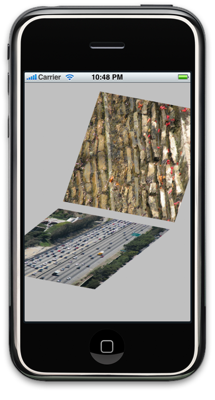
UPDATE 2: Perspective rendering has been added: see below for the details. UPDATE: 3-D scaling using pinch gestures has been added: see below for the details.
Recently, Bill Dudney posted a sample iPhone application that used Core Animation and a concept called a trackball to rotate an object in 3-D space using a finger as input. I actually use a different method of rotation within Molecules, so I thought I'd modify his sample to use that rotation.
That modified example iPhone application can be downloaded here.
I recommend reading Bill's original post about the concept of a trackball for 3-D rotation and its use with Core Animation. Basically, this technique places a virtual sphere around your 3-D object, and as you move your finger around it the sphere is rotated as if you were pushing a trackball around. It's a common technique, but I chose not to use it for the rotation effects in Molecules because it required a bit of code and didn't seem to produce the effect that I wanted.
Instead, I chose to represent the movement of a finger as rotation about two axes, one parallel to the X axis of the display, and the other parallel to the Y axis. For example, if you move your finger up on the display, it rotates the object counterclockwise about the X axis. This rotation method requires fewer lines of code, but you have to do a little matrix math to generate the proper rotation call. Fortunately, Core Animation uses transformation matrices that are identical in form to OpenGL matrices, so I was able to lift some code from Molecules to do the rotation:
CATransform3D currentTransform = transformed.sublayerTransform;
CGFloat displacementInX = location.x - previousLocation.x;
CGFloat displacementInY = previousLocation.y - location.y;

CGFloat totalRotation = sqrt(displacementInX * displacementInX + displacementInY * displacementInY);

CATransform3D rotationalTransform = CATransform3DRotate(currentTransform, totalRotation * M_PI / 180.0,
	((displacementInX/totalRotation) * currentTransform.m12 + (displacementInY/totalRotation) * currentTransform.m11),
	((displacementInX/totalRotation) * currentTransform.m22 + (displacementInY/totalRotation) * currentTransform.m21),
	((displacementInX/totalRotation) * currentTransform.m32 + (displacementInY/totalRotation) * currentTransform.m31));
The rotation is done incrementally, with the existing sublayer transform being modified by the amount of rotation caused between the last touch location and the current touch location.
A few people have asked about how I did the rotation in Molecules, so I hope this simpler example provides another perspective on the code.
Also, don't interpret this as a put-down on the trackball method of rotation. The trackball method produces more appealing results for many types of 3-D rotation. It's more a matter of personal preference, and I happened to choose the axis-based means of rotation for my application. Again, thanks go out to Bill for posting this code as an educational example for iPhone and Mac programmers getting into Core Animation.
UPDATE: For the fun of it, I also added pinch-based scaling of the 3-D views. Again, this code is based on what I used for Molecules. Scaling is a simpler operation and should be straightforward to follow in the code. This newer version of the program can be downloaded here.
UPDATE 2: I implemented a simple means of applying perspective to the CALayers as they're rendered. This version of the program can be downloaded here.